The new Raspberry Pi build of Raspbian now comes with Java 1.7 pre installed.
If you need to set JAVA_HOME it can be set by carrying out the following to your ~/.bashrc
nano ~/.bashrc
then add the following and save the changes
export JAVA_HOME="/usr/lib/jvm/jdk-7-oracle-armhf"
export PATH=$PATH:$JAVA_HOME/bin
when you next login try typing:
export
you will see a list of values, one of which should be
declare -x JAVA_HOME="/usr/lib/jvm/jdk-7-oracle-armhf"
A guide for installing and setting up the java 8 preview is available at :
http://www.savagehomeautomation.com/raspi-jdk8
Sunday, 27 October 2013

Sunday, 6 October 2013
MineCraft: Pi Edition Java Api
I saw a recent post on Raspberry Pi Spy about the Pi edition of MineCraft having a python API and thought it might be fun to play with. After installing, it seems it also has a Java Api which closely follows the Python. The next question was what to write, always a sticking point. I decided upon flipping things on their head a little and have a joystick in MineCraft control my trusty PiBot (I've tried to control it with everything else why not this). Hitting one of the blocks via a right click would launch the Bot into action.

The Bot is controlled by a Web service, so no changes were needed from the code previously written to talk to an android tablet.
The Api includes some examples written by Daniel Frisk along with a Javadoc and Martin O'Hanlon has written some good Python tutorials on his blog http://www.stuffaboutcode.com.
My resulting code can be found at
:https://bitbucket.org/chughes42/minecraft-pi
and the Pibot code is at
https://bitbucket.org/chughes42/remotepibot

The Bot is controlled by a Web service, so no changes were needed from the code previously written to talk to an android tablet.
The Api includes some examples written by Daniel Frisk along with a Javadoc and Martin O'Hanlon has written some good Python tutorials on his blog http://www.stuffaboutcode.com.
My resulting code can be found at
:https://bitbucket.org/chughes42/minecraft-pi
and the Pibot code is at
https://bitbucket.org/chughes42/remotepibot
Sunday, 4 August 2013
Useful Android adb Network debugging commands
Capture network traffic to pcap file:
adb -e shell tcpdump -s 1500 -w /sdcard/capture.pcap
Transfer pcap file from emulator to host pc
adb pull /sdcard/capture.pcap
The pcap file can then be opened in Wireshark.
Sunday, 19 May 2013
Pebble Controlled Raspberry PiBot
The Pebble 2 way Communication SDK for Andoid and iOS has just been released, so what better way to try it out than by adding Pebble controls to my Raspberry PiBot Controller.
Pressing up on the Pebble steers left, select is a toggle between forwards or stop and down steers right.
The web service on the Pi returns a Json status message which is displayed on the Tablet Console. The tablet app also features voice commands via Android Google's android services.

This is also repeated onto the Pebble when a command is sent from either device.

The code for the Pebble app can be found at https://bitbucket.org/chughes42/pebble-pibot-app and is based on the examples included with the Pebble SDK.
Pressing up on the Pebble steers left, select is a toggle between forwards or stop and down steers right.
The web service on the Pi returns a Json status message which is displayed on the Tablet Console. The tablet app also features voice commands via Android Google's android services.

This is also repeated onto the Pebble when a command is sent from either device.

Tuesday, 14 May 2013
Walk the Wight 2013
On Sunday I took part in Walk the Wight 2013, a 26.5 mile sponsored walk in aid of Earl Mountbatten Hospice. The route takes in most of the length of the Island incorporating the Tennyson Trail and includes some wonderful views of the island (weather pending).
In keeping with my usual habit of using gadgets in everything I do I decided to try and record my progress via one of the fitness apps available on my phone. I backed the Pebble smart watch on kickstarter.com and one of the first apps to support it is Runkeeper so that was a logical choice. Runkeeper tracks the route, speed and altitude and lets you view you result via a web portal (the Runkeeper results can be view at http://rnkpr.com/a2ywwyb).
The Pebble has it's own application running on the phone managing the blue tooth connection and providing some notifications, this can be further extended using Pebble Notifier which relays notifications displayed on the phone to the pebble so any tweets or SMS messages I received during the walk were displayed on my wrist instead of having dig my phone out of my bag. This was especially nice in the last few miles of the walk when the weather took a turn for the worse and it was nice to get encouraging messages coming through from friends.
Keeping the GPS running on a phone is a sure way to flatten the battery, so keeping it running for 9+ hours of the walk was going to be an issue. When I was building my Pi Bot project I used a Pebble Smart stick as a power supply, so this was ideal to extend the power to my phone. I have recently switched to using a LG Nexus 4 but it is rather power hungry compared to my older Nexus S so I decided to use my Nexus S instead to further improve the power consumption.
I raised around £120 for the hospice and for most of the walk the weather was sunny and enjoyable even if the last bit did end up rather wet. This was the third time I have taken part in Walk the Wight and every time it is wet I say I am not doing it again but I suspect once my aching muscles have recovered I will think about doing it again sometime.
Links:
Earl Mountbatten Hospice http://www.iwhospice.org/
Pebble Notifier https://play.google.com/store/apps/details?id=com.dattasmoon.pebble.plugin
RunKeeper https://play.google.com/store/apps/details?id=com.fitnesskeeper.runkeeper.pro
Pebble Smart Watch http://www.getpebble.com
Pebble SmartStick http://www.veho-uk.com/main/shop_detail.aspx?article=176
 |
| Walk the Wight Route plotted via RunKeeper |
In keeping with my usual habit of using gadgets in everything I do I decided to try and record my progress via one of the fitness apps available on my phone. I backed the Pebble smart watch on kickstarter.com and one of the first apps to support it is Runkeeper so that was a logical choice. Runkeeper tracks the route, speed and altitude and lets you view you result via a web portal (the Runkeeper results can be view at http://rnkpr.com/a2ywwyb).
The Pebble has it's own application running on the phone managing the blue tooth connection and providing some notifications, this can be further extended using Pebble Notifier which relays notifications displayed on the phone to the pebble so any tweets or SMS messages I received during the walk were displayed on my wrist instead of having dig my phone out of my bag. This was especially nice in the last few miles of the walk when the weather took a turn for the worse and it was nice to get encouraging messages coming through from friends.
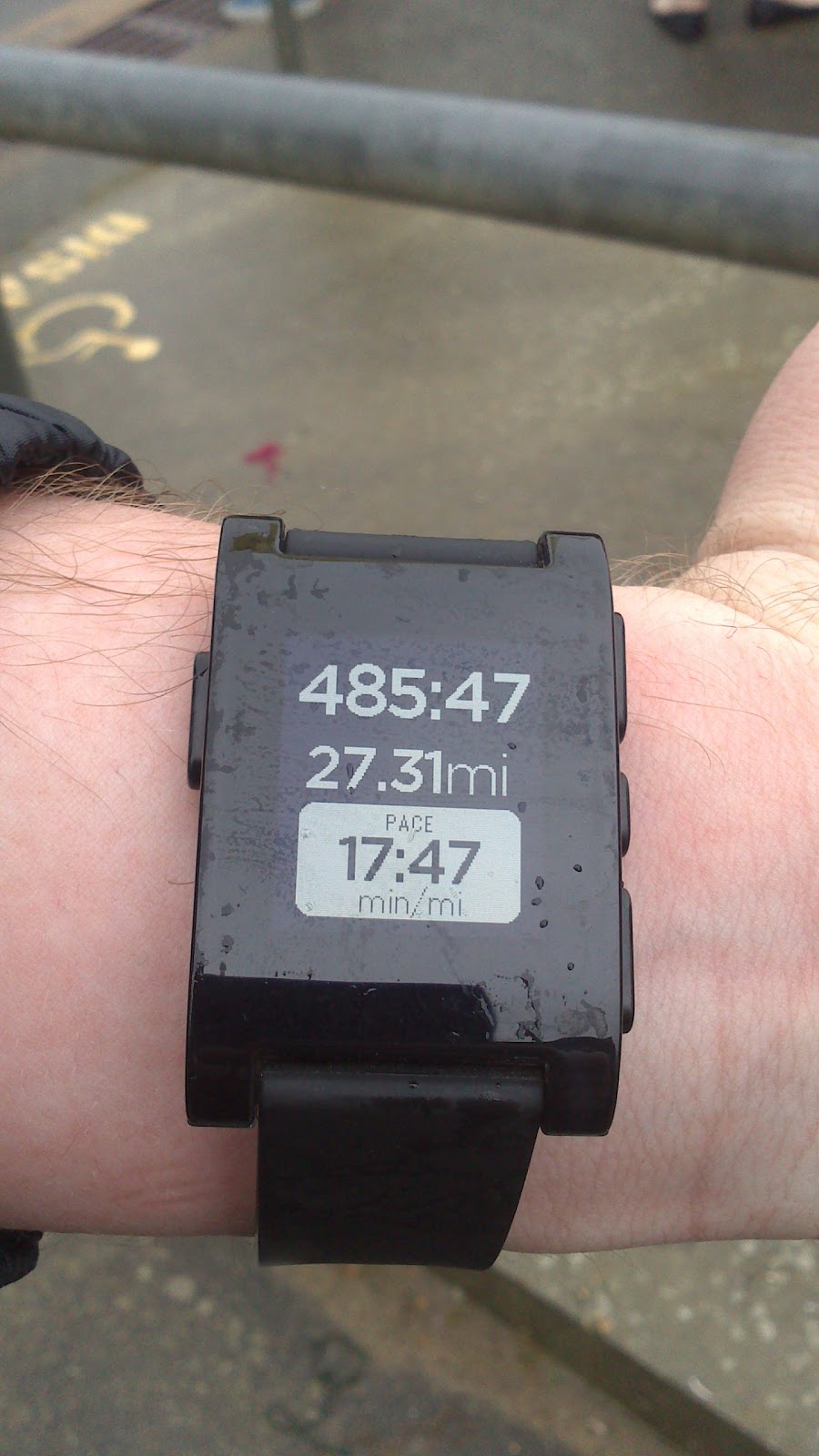 |
| Pebble Watch showing data from the RunKeeper App running on my Nexus S |
I raised around £120 for the hospice and for most of the walk the weather was sunny and enjoyable even if the last bit did end up rather wet. This was the third time I have taken part in Walk the Wight and every time it is wet I say I am not doing it again but I suspect once my aching muscles have recovered I will think about doing it again sometime.
 |
| Finished and you even get a medal! |
Links:
Earl Mountbatten Hospice http://www.iwhospice.org/
Pebble Notifier https://play.google.com/store/apps/details?id=com.dattasmoon.pebble.plugin
RunKeeper https://play.google.com/store/apps/details?id=com.fitnesskeeper.runkeeper.pro
Pebble Smart Watch http://www.getpebble.com
Pebble SmartStick http://www.veho-uk.com/main/shop_detail.aspx?article=176
Tuesday, 5 March 2013
Pi Bot Eclipse Project Repos

Android Pi Controller
Java Servlet (PiBot control code)
I recently gave a chat/demo at #IWDEV 9 using the below slides.
#IWDEV 9 slides
Saturday, 2 March 2013
First run for Raspberry Pi Bot
First test run for my Raspberry Pi powered bot inspired by cymplecy's blog (http://cymplecy.wordpress.com/). I found the magician chassis on a hobby site and was then directed to the blog by a friend. cymplecy used Scratch to program the Pi, I have once again gone for the Pi4J library to control the GPIO port from Java code, running inside a Jetty servlet container.
Apart from it's going backwards, not to bad for a first run.
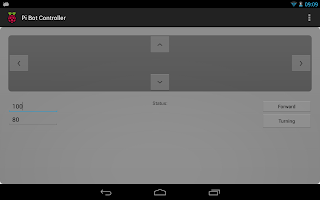
Screenshot from the Android application running on my Nexus 7. The forward and turning speeds can be adjusted and a status is displayed in the lower centre of the screen when a new instruction is sent to the Pi.

Screenshot from the Android application running on my Nexus 7. The forward and turning speeds can be adjusted and a status is displayed in the lower centre of the screen when a new instruction is sent to the Pi.
Subscribe to:
Comments (Atom)